Incoming/Outbound calls
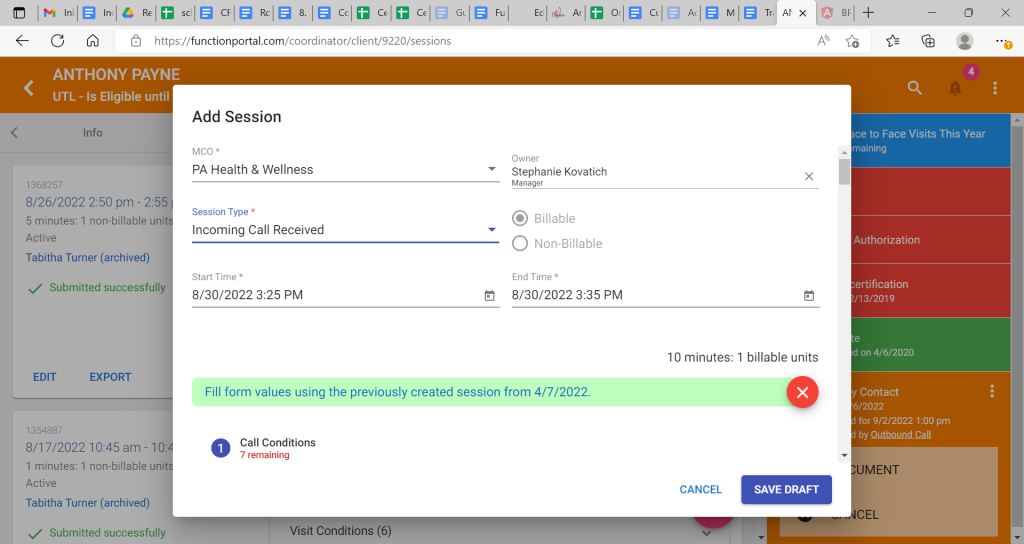
Incoming Call Received
Used to document incoming calls from a participant or POA. SC should discuss the following and document details of the call appropriately.
Note: This session cannot be submitted if the participant has Inactive Eligibility. Document the call as “Office Note”
Session Requires:
- Appropriate answers to all required fields
Process:
- When a call is received by the Service Coordinator directly from the participant or their Authorized representative, Incoming call Received Session is selected from the dropdown menu after clicking on the blue “+” in the participant’s “sessions” tab.
- Service Coordinator must document the specifics of the call and who they spoke with in the Function Portal Session
Documentation:
1) Call Conditions
- Reason for Contact: Please type in great deal on what information was obtained during the call.
- Was the Legal Representative invited to participate? – Did you or the participant try to involve the participant’s Legally Authorized Representative, if there is one at all?
- Based on your answer you may need to answer the following:
Did the Legal Representative participate in the contact?
Did the member request that the legal representative not participate?
- Where did the visit take place? – Better known as “where did the contact take place?
- Answer should be “Other” if the contact was over the phone
- Then in “Other visit location” you should put “Telephonic”
- Answer could be any of the following, if the contact was “Face to Face”. SC should select the most appropriate option for where the visit took place.
- Adult Day Care
- Adult Family Care Home
- Assisted Living Facility
- Home (Alone)
- Home (With a caregiver)
- Hospice Facility
- Hospital
- Mental Health Facility
- Nursing Home
c) Where does the participant currently reside? – The coordinator should be confirming the client’s address and type of residence, then choose the appropriate answer.
- If the answer is “Home (with a caregiver)” then the coordinator needs to document the following information about the caregiver.
Caregiver name
Caregiver relationship
Does the caregiver live with the member?
Does the caregiver provide natural support? – meaning does the caregiver provide informal/unpaid support?
Is the caregiver paid?– meaning does the caregiver provide formal/paid support?
- If the answer was “Other” then the coordinator needs to state what the Other residential location is
- If the answer was: “AFCH, ALF, Hospice, or Nursing Home” then the SC must document the name of the Residential location facility.
d) Information provided by** – Meaning, who did the coordinator speak with during the call.
- If information was provided by Enrollee, Authorized Representative, or both, then you make the appropriate selection
- If information was provided by Other or Enrollee and Other, the name of the person/people you spoke with and their relationship to the participant should be documented.
e) Did the participant’s demographics change? – Has any of the information about the participant changed?
- If there was a change, then the coordinator must state what the changes are, documenting the new demographic information in the session.
- Critical Incident Check
Has PTP had any of the following within the last 90 days? Please select from the following options:
- Emergency Room Visit – No Admission
- Unplanned Hospital Admission
- Unplanned Mental Health Facility Admission
- Abuse
- Neglect
- Exploitation
- Serious Injury
- Reportable disease
- Provider or staff misconduct
- Service Interruption
- None of the Above
If any of these categories occurred, it will ask you to document how many: Please review through Tasks and Sessions for Function Portal. If documentation for the following incident has not been completed, it will ask you to complete the following Incident Report Part A. ( please refer to Incident report scheduling guide)
- Scheduling
A. If there is an upcoming visit due date in Function Portal, then the SC MUST attempt to schedule it during participant/POA contact.
- If the visit is scheduled, then the SC will specify the date, time, and type of visit.
- Once selected, you will need to provide a summary of the scheduling outreach.
B. If no visit is due, you will select no for “Do you need to schedule a visit?”
- Compliance- (will only unlock if a visit is scheduled)
- Is follow-up required for the contact?
- Is the scheduled visit after the scheduled compliance due date? Select between Yes or No. **SELECTED IF VISIT IS PAST DUE**
If yes is selected, it will ask you to select the following?
A. Who were you trying to contact?
- Select Member or Member’s Responsible Party based on contact.
B. Reason for contact
- Select the appropriate visit type
C. Is follow up required?
- If Yes, please describe the follow up.
Outbound Call
Used to document calls made to the participant and/or their responsible parties from the service coordinator. You should discuss the following and document details of the call appropriately.
Note: This session cannot be submitted if the participant has Inactive Eligibility. Document the call as “Office Note”
If the SC spoke to PCP, PHW, or anyone that is NOT the participant or their responsible parties, they MUST then make a call to the participant, to provide follow up, and then document an Outbound call.
Session Requires:
- Appropriate answers to all required fields

Process:
- When a call is placed by the Service Coordinator directly to the participant or their Authorized representative.
- Service Coordinator must document the specifics of the call and who they spoke with in the Function Portal Session
Documentation:
Section 1: Call Conditions
- Was a visit scheduled during the call?: Select yes or no.
- Name of person SC spoke with/Relationship of person SC spoke with: Document name and relationship.
- Reason for contact: Document in great detail what occurred during the call.
- Where does the participant currently reside?: Coordinator should be confirming the client’s address and type of residence, then choose the appropriate answer.
- If the answer was “Home (with a caregiver)” then the coordinator needs the following information about the caregiver.
- Caregiver name
- Caregiver relationship
- Does the caregiver live with the member?
- Does the caregiver provide natural support? – meaning does the caregiver provide informal/unpaid support?
- Is the caregiver paid?– meaning does the caregiver provide formal/paid support?
- If the answer was “Other” then the coordinator needs to document the Other residential location.
- If the answer was: “AFCH, ALF, Hospice, or Nursing Home” then the Residential location facility name must be documented in this session.
5) Information provided by** – Meaning, who did the coordinator speak with during the call.
- If information was provided by Enrollee, Authorized Representative, or both then you make the appropriate selection
- If information was provided by Other or Enrollee and Other, the name of the person/people you spoke with and their relationship to the participant should be documented.
6) Did the participant’s demographics change? – Has any of the information about the participant changed?
- If there was a change, then the coordinator must state what the changes are, documenting the new demographic information in the session.
Section 2: Scheduling- This will only populate if you indicated in Section 1 that you needed to schedule a visit.
A. If there is an upcoming visit due date in Function Portal, then the SC MUST attempt to schedule it during participant/POA contact.
- If the visit is scheduled, then the SC will specify the date, time, and type of visit.
- Once selected, you will need to provide a summary of the scheduling outreach.
Section 3- Unsuccessful Outreach– This will only populate if you indicated in Section 1 that you needed to schedule a visit.
A. Is the scheduled visit after the scheduled compliance due date?
- Select no if visit is not past due
- Select yes if visit is past due (More questions will populate)
B. Type of Past Due Contact
- Specify which contact is past due
C. Who were you trying to contact?
- Select Member or Member’s Responsible Party based on contact.
D. Reason for contact
- Select the appropriate visit type
E. Critical Incident Check
Has PTP had any of the following within the last 90 days? Please select from the following options:
- Emergency Room Visit – No Admission
- Unplanned Hospital Admission
- Unplanned Mental Health Facility Admission
- Abuse
- Neglect
- Exploitation
- Serious Injury
- Reportable disease
- Provider or staff misconduct
- Service Interruption
- None of the Above
If any of these categories occurred, it will ask you to document how many: Please review through Tasks and Sessions for Function Portal. If documentation for the following incident has not been completed, it will ask you to complete the following Incident Report Part A. ( please refer to Incident report scheduling guide)
Practice Incoming and Outbound calls
- In Test Function Portal for one of the participants assigned to you, complete an Incoming call session.
- Go to the “sessions” tab and click the pink “+” sign and then select “Incoming call” to begin. Hit submit once completed your session.
- For the same participant, complete an Outbound call session.
- Go to the “sessions” tab and click the pink “+” sign and then select “Outbound call” to begin. Hit submit once completed your session.
- Let your Trainer know once you have documented your Incoming and Outbound call sessions, so they can review with you and answer any questions you may have.
Related Post